Yes Please! How to Get Your Call to Action to Convert

Are your website visitors doing exactly what you’d like them to? What about your blog readers and newsletter subscribers – how often are they taking the next step?

Generating conversions is key to staying in business. But when existing or potential customers aren’t biting, it’s time to reevaluate your calls to action.

If you want better results for your online efforts, here are 5 optimization tips to help you get your call to action to convert. 

[ctt title=”Here are 5 optimization tips to help you get your call to action to convert. ” tweet=”Here are 5 optimization tips to help you get your call to action to convert via @fingerprint http://ctt.ec/3JePd+ ” coverup=”3JePd”]

Write in the First Person

Many calls to action use boring copy, like “Download your guide,” “Book a consultation” or event “Click here.”

CTAs like these don’t inspire much action because they focus on what you want visitors to do next, rather than what visitors want to do next. By simply swapping out “your” to “my” or “me,” you can quickly increase conversions by speaking to what it is they want to do.

Inspire Action with Verbs

Ready to get your calls to action to convert? Don’t start them with adjectives. Instead, use action verbs that tells readers exactly what will happen when they click.

Not all verbs are created equal. When it comes to copywriting, words like “buy” and “get” convert better than their equivalents, “purchase” and “download.”

Here are some first person examples of calls to action that start with action verbs:

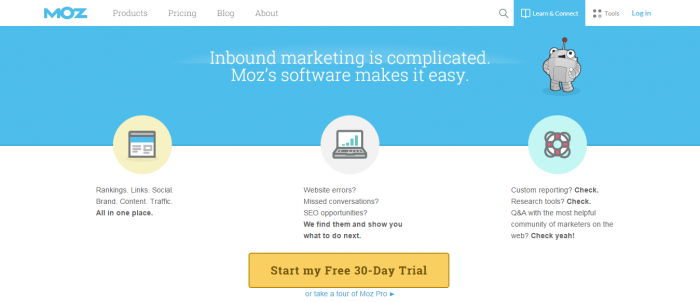
  • Start my free trial
  • Create my account
  • Book my consultation
  • Get my free sample
  • Find my gym
  • Send me the guide
  • Show me how
  • Tell me more


Moz call to action

Create a (Subtle) Sense of Urgency

Is your offer available for a limited time? Are there a limited number of products available?

Qualifying your offer will motivate visitors to take action – now. An easy way to do this is by using words that subtly encourage clicks in your call to action copy, such as “hurry,” “now” and “today.” You can also specify the number of slots available for a particular service or the number of products left to buy before they’re sold out.

godaddy - call to action

Make It Clickable

Is that a button? Or is it part of the surrounding text? If visitors don’t know to click on something, they won’t. This means you need to make it eye-catching (but not so overdone that the 90s come a-calling).

Try these tips for creating a more engaging call to action:

  • Opt for a color that pops and is easy to see
  • Use plenty of whitespace around the button
  • Choose a size that stands out but isn’t overpowering
  • Keep the copy short and snappy
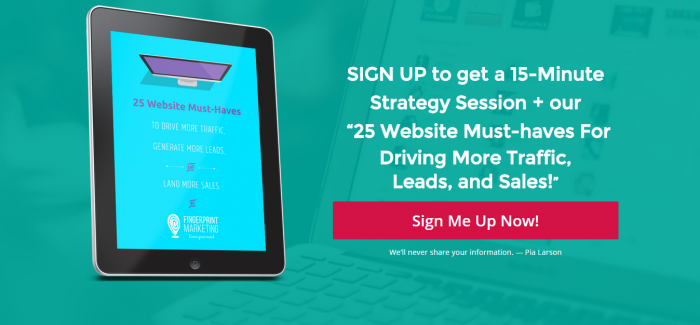
Fingerprint Marketing - call to action

Make your call to action pop.

Test It Out

What works for one audience may be a turnoff for another. So never assume what your visitors will prefer. As they say, always be testing. And the best way to know your call to action is effective is to run an A/B test.

Optimizing your calls to action requires little effort. Online platforms like Optimizely and Unbounce can help you get it done quickly. And by making just a few simple tweaks, you can be well on your way to saying “show me the money.”

Here are a few ideas for testing your calls to action:

  • Change just one word in the copy
  • Play with different button colors, shapes and sizes
  • Vary the button location on the landing page
  • Find out if text links or buttons work better
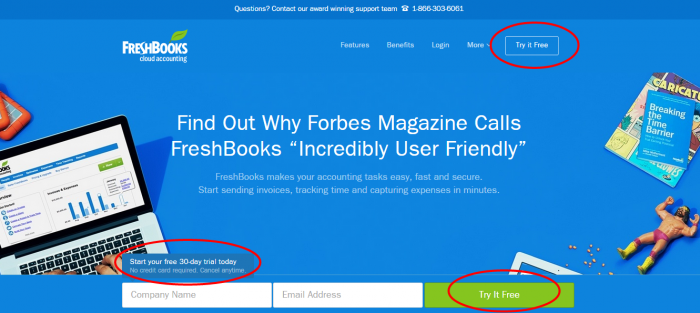
Freshbooks call to actions

Put your call to action in different areas of your site and test which one converts the most. In this example, FreshBooks was able to put 3 calls to action above the fold.

Over to You

Do you have a high-converting call to action? We want to see it! Share your winning CTA in the comments below.

Addressing the Most Frequent Review Objections

Q: But I do have the most reviews overall! Why should I work to get 2 reviews a week when I have 300 more than my next closest competitor?

A: Because those 300 extra reviews likely happened over 5 years. Google doesn’t care. Google cares about which business is actively engaging now. Think of it this way: In a town with two bakeries, would you trust the one that was popular in 2018 or the one that has fresh 4.8-star reviews from yesterday?

Q: How can I automation reviews without looking “spammy” or robotic?

A: The key is timing and personalization. An email sent 4 days later is spam. An email triggered 24 hours later by their POS interaction, referencing their specific visit, and saying, “We love seeing you!” feels like a personalized follow-up. Keep your request language human and humble: “We’re a local business that thrives on honest feedback…” rather than “GIVE US 5 STARS!”

Q: Will getting a 4.1-star review on my 90-day rolling average hurt me more than helpful old 5-star reviews?

A: This is nuanced. A single, recent 4.1 review won’t “tank” you, as your overall (though less-weighted) average is still high. However, if your last 10 reviews in the 90-day window average to a 3.5, you will almost certainly drop in rankings, as Google sees you as a business that is currently underperforming, despite past success. This is why automation that triggers happy customers is critical.

Q: Is it true that Google filters “glowing” 5-star reviews as fake more than “authentic” average reviews?

A: No, that’s a myth. However, Google (and users) do look at patterns. Fifty identical, one-word “GREAT!” reviews left in two days will get flagged. A steady stream of slightly detailed (e.g., mentioning a specific employee or dish), varied (e.g., some detailed 4-star, some simple 5-star) reviews left consistently over weeks is the goal. Authenticity (a mix of opinions) does increase user trust, which improves conversion rate, but Google won’t penalize a legitimate string of recent 5-star acclaim.

Q: If the 90-day window is so critical, what happens if I go on vacation and get 0 reviews for two weeks?

A: This will absolutely create a “dip” in your ranking signals. While you won’t drop from #1 to #20 overnight, your competitors who continued to receive consistent feedback during those two weeks will gain algorithmic ground. This is the ultimate argument for automation. Your automation triggers reviews while you sleep, making your presence constant.

Q: My customers are mostly older/not tech-savvy. How can I possibly automate this or get them to leave a digital review?

A: This is a real challenge, but not insurmountable. Automation can adapt. Instead of automated SMS, use simplified technology: A physical table tablet at checkout that asks for email/phone, or a single-click “feedback” kiosk that opens a form (though this must be used carefully so it’s not a “captive review”). The most effective way is to pair automation (like the email) with a human script: Have staff hand them an appointment card with a QR code and say: “We love serving you! If you get an email from us tomorrow asking for feedback, we would truly value your perspective.”

Conclusion

The old playbook of gathering as many reviews as possible is dead. In 2026, dominance on Google Maps belongs to the businesses that have integrated review generation into their operational DNA.

Success in local SEO now requires prioritizing Review Velocity over total quantity. It demands recognizing the overwhelming influence of the current 90-Day Window. By naturally automating your review acquisition—from post-appointment emails to SMS triggers at point-of-sale—you are ensuring a sustainable, steady stream of feedback that proves to Google and customers alike that your business is vibrant, reliable, and relevant today.

Stop focusing on the count. Start focusing on the flow.

Want us to help you grow your reviews consistently? Let’s Chat!

Join over 5,000 Marketing Minute subscribers who receive weekly videos and tips on how to step up your marketing game

  • This field is for validation purposes and should be left unchanged.

We’ll never share your information – Pia Larson